Lighting and Cameras Without Grid Power
Cameras and lights often fail together when the grid drops. Separate them now, before the outage shows you which devices were only daylight tools.
How we reviewed this
Reviewed editorially from public vendor information; no hands-on testing claimed.
Quick answer
- Audit offline behavior
- Put one lamp in the waiting room
- Test monthly
The problem
When the grid fails, cameras and lights usually fail together. That leaves a blind spot exactly when you want information. The fix is to separate lighting from the mains and to be honest about what your cameras can actually do offline. Many people discover the gap during the outage itself, when the router is dark and the app shows a grey screen. A ten-minute audit beforehand turns that surprise into a known limitation. You may decide to keep one cellular camera and drop the rest, which is a better outcome than paying for a system that only works on ordinary days. Cameras add a particular trap: an app that looks reassuring in daylight but shows a frozen frame when the internet drops. Decide now whether you will trust that frame. If the answer is no, treat the camera as a daylight tool and plan your outage awareness around light and people instead. Decide which room you would sit in if the power stayed out all night. Put the lamp there first, then cover the entry point.
Step-by-step
- Audit each device: List which cameras have local storage, which need Wi-Fi, and which have battery backup. Mark the ones that will fail. Be strict: a camera that needs your home router is offline during a grid outage unless the router itself has backup power.
- Place battery light first: Put one shielded lantern near the main entry and one in a common room. Low and directed beats bright and omnidirectional. Position them so you can move without silhouetting yourself at a window.
- Add a power bank: Keep a charged bank and short cable for the one device you would actually check during an outage. Label it and recharge it on the same date you rotate batteries.
- Set a runtime plan: Use low brightness in stages. Two hours of usable light tonight beats full brightness for twenty minutes. Decide in advance which rooms get light first if the outage lasts past midnight.
- Test monthly: Unplug the router for ten minutes and see what still works. That is your real offline setup. Note the result on your checklist and fix one thing before the next test.
Where a product fits
A kit that includes portable lighting is useful here. Do not buy a camera bundle unless it explicitly works without your home router. Lighting and a written plan come first. If one camera does survive offline, keep it pointed at an entry point you can see from a safe room; information you cannot reach is not much use during a blackout. After an outage, record which device actually helped. Usually it is the lamp, not the camera. That record stops you from buying another gadget next month and keeps the kit focused on what earns its place. Keep a written list of what survives offline; a camera that only works on ordinary days should not be counted.
Verdict
Light and a written plan come first. Count a camera only after it works with your router unplugged, and record which device actually helped.
Frequently asked questions
Will cameras work without power?
Only if they have local power and storage or a cellular backup. Most Wi-Fi cameras fail when both grid and router are down. Check the spec sheet for battery runtime and offline recording before you count a camera as part of the plan. If a camera claims offline recording, confirm where it stores footage and how you retrieve it without the internet. If retrieval needs a laptop, it is not an outage tool.
Where should light go?
One low, shielded indoor light and one outdoor light aimed at entry points. Avoid flooding every window. A little controlled light helps you see; too much tells everyone exactly where you are. Aim light across a doorway, not directly into the eyes of whoever approaches.
How long do battery lights last?
Varies by brightness. Test yours on the low setting and plan runtimes rather than trusting the package claim. Write the observed runtime on the lamp with a marker so the next review is easy. A lamp with a handle is easier to move than one you have to unplug.
Do I need a camera at all?
Not necessarily. A light and a neighbour check-in often provide more useful information than a dead camera. Add a camera only after you have confirmed it works with your router offline. A whistle is cheap backup when a screen is dead.
Back to Home Security & Preparedness
Keep reading
Related offer
Anti-Looter Kit - BRAND NEW!
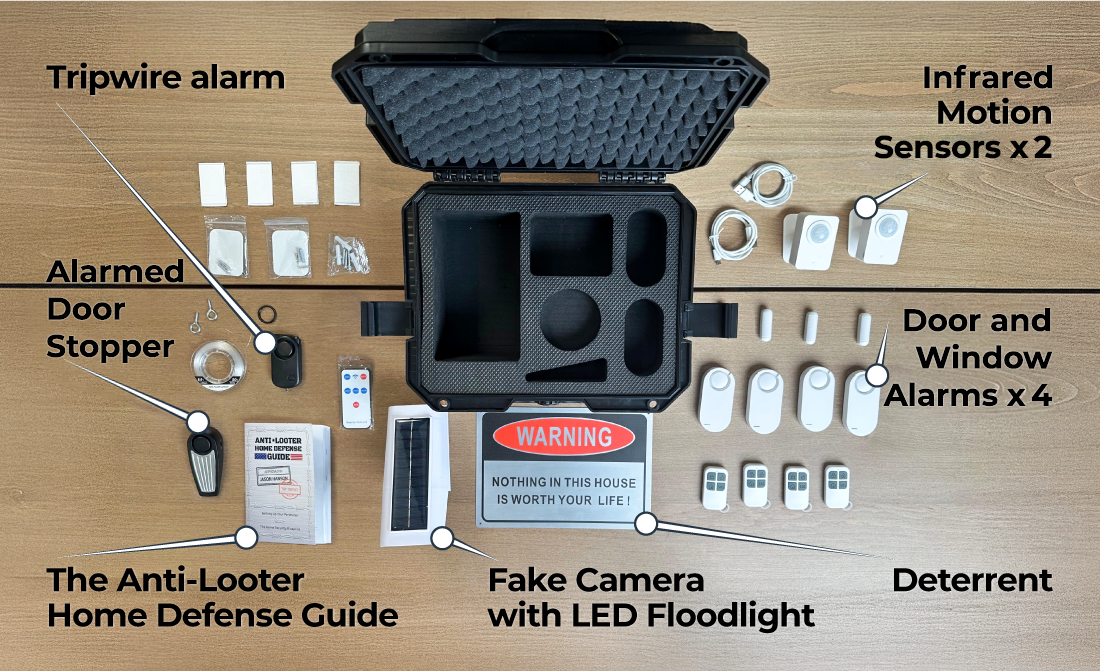 Explore Anti-Looter Kit - BRAND NEW!